
Have questions? We’ve got answers.
Home Internet
Service
How fast is WeLink’s Wireless Fiber internet?
The average download speed in the US is about 100 Mbps and the upload speed is about 33 Mbps. With WeLink, you’ll get symmetrical Gigabit speeds. That’s over 10x faster than the average US speed.
How much does it cost to install?
There’s no up-front cost to get WeLink installed at your place. In other words, installation is free.
How can I find out the speed of my current internet?
You can visit www.speedtest.net; it will tell you exactly what your internet speed is.
Does WeLink offer unlimited data?
Yes, home internet plans from WeLink come with unlimited data, so you can do more online without worrying about data caps. With WeLink internet at your place, you get a blazing fast, unlimited, and totally awesome internet connection.
What equipment is included with my plan?
Standard equipment includes one or more network receivers, one WiFi router, one high-speed modem, and may include one backup broadband power system device.
Do you offer TV and phone?
We don’t currently offer these services, but we’d be happy to recommend a few options that will save you money each month. Check out our guide on essential streaming services and our tips on replacing your home phone.
Equipment Setup
During installation, where is the equipment placed?
A small network receiver is placed on your roof, while a new power supply and WiFi system are placed inside your home.
How large is my network receiver?
Most homes will get our smallest receiver, while a few homes that are part of the network framework will get a slightly larger receiver that is compact and much smaller than a typical satellite TV dish. Either way, you likely won’t even notice them on the roof of your home.
Service Areas
Where do you offer service?
Our coverage areas are available on our website at welink.com/coverage-areas/. On this page, you can get detailed information regarding the availability of our services in different areas across the U.S.. Our coverage areas include major cities such as Los Angeles, Las Vegas, Dallas, Phoenix and other major metropolitan areas. We are constantly working to expand our services and extend our reach into more markets and rural areas throughout the country.
How do I know if service is available in my area?
To find out if you can get WeLink internet, visit us online at welink.com/sign-up and fill out the online form, or contact us and a WeLink Pro will be happy to assist you.
Do you plan to bring internet to my neighborhood?
We’re rapidly expanding our network coverage every day. You can visit us online at welink.com/coverage-areas to find out if WeLink is being offered in your city. For more information on WeLink internet coverage in your area, contact us today.
My neighbors have WeLink internet, can I get it too?
If we’ve already rolled out a new network in your area, chances are we can connect you to the network. If you’re in an area with weak coverage, we may not be able to connect you immediately, but don’t worry—it won’t take us long to get to you.
Network Rollout
Where does my wireless signal come from?
The signal to your home comes from an ultra-fast fiber connection that is sent to nearby homes and relayed to others for wider wireless coverage.
How does WeLink build its networks?
We start by building a Fiber PoP (Point of Presence) and connecting a select group of homes to help us build the framework of the new network. We then expand our network by connecting more homes, which helps us fill in gaps and strengthen coverage. And finally, we connect everyone to the network. Check out this video to learn more.
How long does it take to build a new network?
The amount of time it takes to roll out all new broadband coverage can vary by area. Exact timing depends on a variety of factors including the number of homes in your network, geography, and whether your home requires an in-person roof assessment. It may take anywhere from a few weeks to a few months from the time you sign up to schedule your installation and network activation.
How do I know if I’m part of the network rollout in my area?
If you live in an area where we are currently building a new network, you’ll be notified and receive regular build progress updates through email. In rare situations, we cannot connect some homes until we expand our network coverage. If this happens, we’ll contact you to let you know.
What is a network plan and why is it necessary?
We build our networks in phases to establish, expand, and strengthen our coverage. This requires careful planning and precision from the ground up so that everyone connected will have the strongest signal possible. Let’s just say that a little planning goes a long way.
Does every network you plan take the same amount of time?
A lot of things impact the timing of each network rollout, everything from permitting to initial plans to the number of homes in the area. While we’re incredibly efficient with this process and we’re happy to take care of all the important details, the timing will vary from community to community.
I’ve seen WeLink trucks in my neighborhood, is my home close to being connected?
You may see our friendly WeLink Pros in your location from time to time, especially as we build your area’s framework. If you see us around, we’re busy getting your neighborhood primed for internet. Which means we’re getting closer to having your new network online. We’ll reach out to you as soon as we’re ready to get you connected.
After a network is built, can anyone get WeLink internet?
Homes that are not currently connected to WeLink will not be able to receive WeLink service on their own. If a home is in-network and would like to use WeLink internet, we’ll need to provide them with the right equipment and get them connected to the network first.
Homeowners Association (HOA)
Can your HOA prohibit WeLink equipment or require homeowners to get approval?
No, your HOA cannot stop you from installing WeLink equipment. Federal law (OTARD rules) allows homeowners to install WeLink equipment, and HOAs cannot prohibit or require approval for installations. You can learn more about this at the FCC website.
What if my HOA disagrees or wants to impose restrictions?
As you can read on the Federal Communications Commission (FCC) website, the burden of proving that a restriction is appropriate under OTARD or other federal laws is placed on the HOA or other entity seeking to enforce a restriction or penalty. Instructions on that website link show how an HOA could see the FCC to weigh in and approve a restriction.
Homeowners can also initiate action from the FCC to intervene and reinforce that OTARD protects their rights. Doing so puts the burden on the HOA seeking to enforce a restriction to prove that their restrictions/penalties are justified.
Are there any exceptions?
Exceptions are rare but can include historical preservation areas or other specific circumstances. In most cases, homeowners have the right to install WeLink without needing HOA approval.
Click here to learn more about your rights.
If your HOA tries to impose restrictions, they must provide proof to the FCC explaining why they believe restrictions should apply. Homeowners also have the right to ask the FCC to review and enforce OTARD protections if necessary.
We’re here to help make getting high-speed internet as easy as possible for you!
How do I know if I’m part of the network rollout in my area?
If you live in an area where we are currently building a new network, you’ll be notified and receive regular build progress updates through email. In rare situations, we cannot connect some homes until we expand our network coverage. If this happens, we’ll contact you to let you know.
What is a network plan and why is it necessary?
We build our networks in phases to establish, expand, and strengthen our coverage. This requires careful planning and precision from the ground up so that everyone connected will have the strongest signal possible. Let’s just say that a little planning goes a long way.
Does every network you plan take the same amount of time?
A lot of things impact the timing of each network rollout, everything from permitting to initial plans to the number of homes in the area. While we’re incredibly efficient with this process and we’re happy to take care of all the important details, the timing will vary from community to community.
I’ve seen WeLink trucks in my neighborhood, is my home close to being connected?
You may see our friendly WeLink Pros in your location from time to time, especially as we build your area’s framework. If you see us around, we’re busy getting your neighborhood primed for internet. Which means we’re getting closer to having your new network online. We’ll reach out to you as soon as we’re ready to get you connected.
After a network is built, can anyone get WeLink internet?
Homes that are not currently connected to WeLink will not be able to receive WeLink service on their own. If a home is in-network and would like to use WeLink internet, we’ll need to provide them with the right equipment and get them connected to the network first.
Account Management
Account Access
What email do I use to sign in to my.welink.com?
You must use the email address associated with your WeLink subscription to sign in to my.welink.com. You can contact us for help if you are unsure of what email address you used when you signed up.
What do I do if my one-time secure password for my.welink.com expires?
Your one-time secure password is valid for use up to 14 days after you first request it from my.welink.com. If it has been more than 14 days since you last requested your one-time secure password and you would like to request a new one, simply visit my.welink.com and re-enter the email address associated with your WeLink account. When the screen prompts, you can click the button that says, “Resend the one-time password to receive a new one-time secure password.”
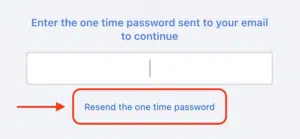
What do I do if I can’t find my one-time secure password for my.welink.com?
When you request your one-time secure password from my.welink.com, it will deliver a one-time secure password to the email address on your account. If you requested your one-time secure password and you have not received it, try waiting a few minutes and then check your spam or junk mail folders in your inbox. If you still have not received your one-time secure password, then please contact WeLink customer service for assistance.
Do I need to set up a new password if I already have an account?
If you are using my.welink.com for the first time, then you will need to request a one-time secure password to sign in. After you have signed in for the first time, my.welink.com will prompt you to set a new password that you can save for future use.
Billing & Payments
About EasyPay
What is EasyPay?
EasyPay lets the Account Owner set up recurring, automatic monthly payments for your internet bill. No matter which WeLink plan you have, you can use EasyPay and paper-free billing to pay your bill.
When will my first automatic payment take effect?
When you sign up for EasyPay you’ll receive an enrollment confirmation message communicating your automatic payment date.
If my plan includes a trial, when will I be billed?
If you are enrolled in a free trial, you will be billed at the end of your trial period.
How do I set up EasyPay?
By default, your WeLink subscription is set up for automatic recurring monthly payments. If you’ve unsubscribed from automatic payments and would like to enroll again, visit my.welink.com and follow the onscreen prompts.
Note: If you select a payment date that’s the 29th, 30th or 31st, your payment will be made the preceding day for months that don’t include that date. The subscription will renew on the last day of the month.
How do I add or change my EasyPay payment method?
You can change your EasyPay payment method at any time at my.welink.com. Just go to the Manage Your Payment Settings page and select Edit next to the payment method.